OPC DA
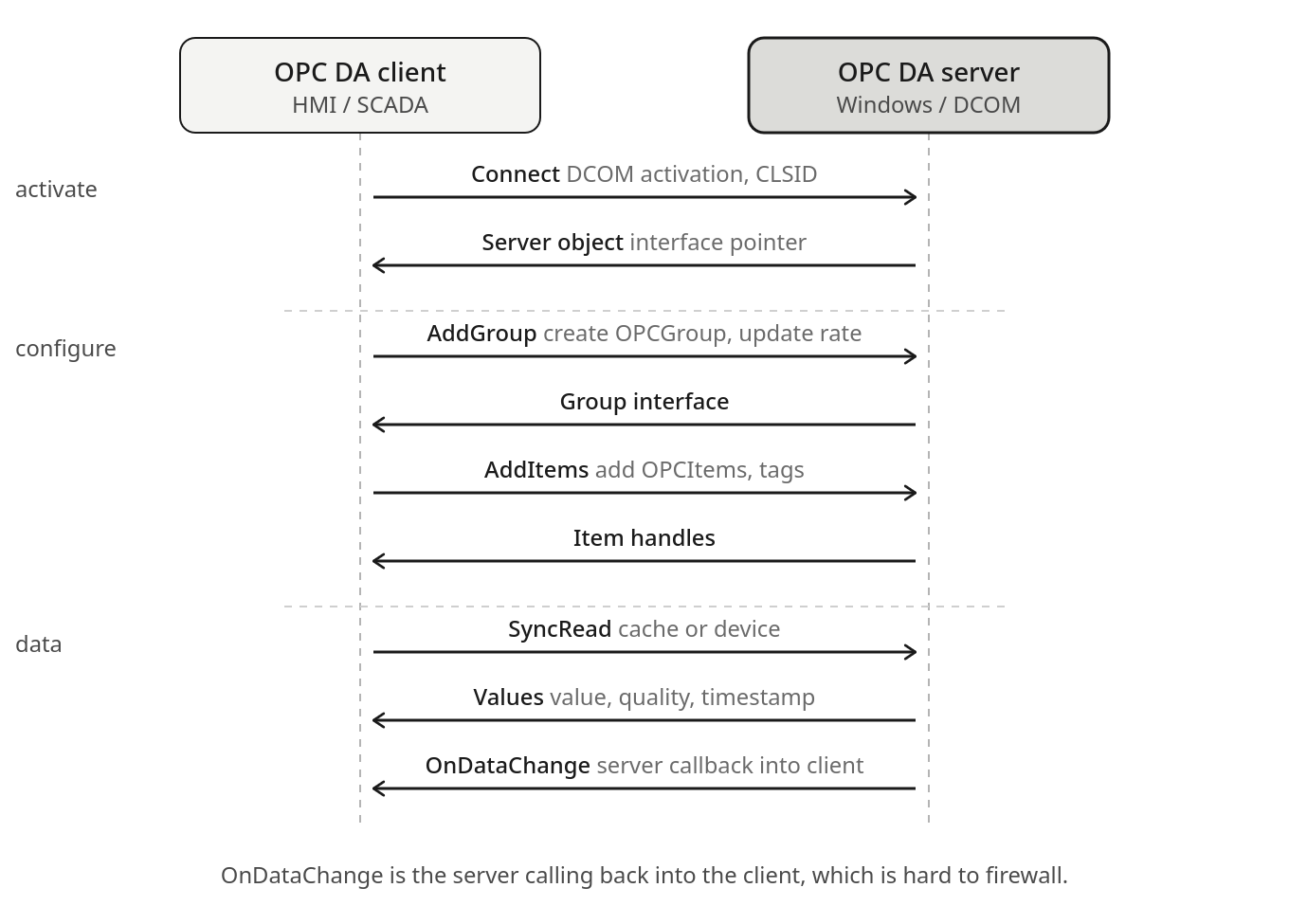
OPC DA is the original OPC, Windows-only and built on Microsoft COM and DCOM. The client activates the server through DCOM, creates a group with an update rate, adds the items it cares about, and reads. The awkward step is the last one. OnDataChange is not the client polling, it is the server calling back into the client process, which means DCOM has the server opening connections in the reverse direction over negotiated dynamic ports. That is the property that makes an OPC DA client and server notoriously hard to separate with a firewall, and it is a fair part of why OPC UA was created with its single outbound channel and pre-sent Publish requests. DCOM authentication does exist, but configuring it well is fiddly, so OPC DA in practice tends to be kept on a trusted segment or tunnelled.
Starting in 1996
OPC DA (Data Access) was published by the OPC Foundation in 1996 as the first specification in what became the OPC Classic family. It defines a standard interface for real-time process data exchange between Windows applications: an OPC DA server exposes live process values from a PLC or DCS, and OPC DA clients, typically SCADA systems, historians, and HMIs, connect to read and write those values. The standard solved a real problem: before it, every combination of SCADA software and field device required a bespoke driver. After it, a device vendor could ship a single OPC DA server and any compliant client could connect.
The mechanism it uses for that interoperability is Microsoft’s Distributed Component Object Model (DCOM). That choice made OPC DA Windows-only, firewall-hostile, and difficult to secure. OPC UA was designed from 2006 onwards to replace it. OPC DA is still running in a large fraction of existing installations.
The DCOM model
COM (Component Object Model) is a Windows inter-process communication mechanism. DCOM extends it across a network using RPC. An OPC DA server is a COM server: it exposes interfaces (IOPCServer, IOPCItemMgt, IOPCDataCallback) that clients instantiate and call as if they were local objects. The network transport is handled by DCOM transparently.
To establish a DCOM connection, a client first contacts the DCOM endpoint mapper on port 135 of the server machine. The endpoint mapper returns the dynamic port on which the target COM object is listening. The client then connects to that port. Because the listening port is allocated dynamically from the Windows RPC dynamic port range (by default 49152 to 65535 on Windows Vista and later, or 1024 to 65535 on older systems), a firewall between client and server blocks the connection unless port 135 and the entire dynamic range are open, or the range configured for RPC. Configuring a narrow, fixed port range for DCOM requires a registry change and application restart, and is done in few installations.
Security configuration and its gaps
DCOM includes a Windows authentication layer using NTLM or Kerberos. The authentication level is configurable: None, Connect, Call, Packet, Packet Integrity, or Packet Privacy, in increasing order of protection. Many OPC DA deployments run at reduced authentication levels because the default Windows security settings for DCOM cause connectivity failures when the client and server machines are in different Windows domains or workgroups, which is common in OT environments where the OPC server sits on the OT network and the SCADA clients sit on a different segment.
The OPC Foundation’s own guidance on DCOM security settings, written to resolve the connectivity problems, recommended settings that relaxed authentication requirements. The result in many sites is an OPC DA server configured for anonymous or minimal-authentication DCOM access. A Windows machine on the same network segment that can reach port 135 can enumerate the available COM objects, instantiate the OPC DA server interface, browse the OPC item namespace, read all available process values, and write to any item the server exposes as writable.
The OPC server process also carries the privilege profile of whichever Windows account it runs as. Servers configured to run as SYSTEM or local administrator, common in older installations, mean that a vulnerability in the OPC server software or in DCOM itself translates to a privileged code execution path on the OT Windows machine.
The DCOM enumeration path
The OPC server machine occupies a structurally attractive position: network connectivity toward the PLCs and DCS on the process network, and network connectivity toward the SCADA and historian clients on the station bus or the IT/OT boundary. Compromising the OPC server machine provides a vantage point into both directions.
Port 135 is the entry point. From there, the endpoint mapper returns the dynamic port for the OPC server COM object, and standard tools do the rest:
# Identify OPC server machines by the endpoint mapper
nmap -p 135 --script msrpc-enum --open 10.0.0.0/24

# List registered COM objects and their allocated dynamic ports (Impacket)
python3 rpcdump.py 10.0.0.60
On a server running with reduced DCOM authentication, reading the OPC namespace requires no credentials. The namespace browse returns the complete set of available items: every tag the server exposes, including its name, data type, and current value. For a historian client, that is the intended behaviour. For an attacker mapping a new target, it is a complete read of the process data model without any prior knowledge of the device configuration.
Write access to OPC items maps directly to PLC or DCS outputs, depending on what the OPC server exposes as writable. The OPC DA server mediates the write: a client that calls IOPCSyncIO::Write on an item address causes the server to issue the corresponding write to the underlying device using whatever protocol that device speaks. The OPC layer provides no additional access control beyond what DCOM authentication (if any) already checked.
The 2016 Industroyer malware, which caused the second Ukraine power grid outage, included an OPC DA client component. It connected to OPC DA servers in the targeted substations, browsed the item namespace to locate relevant control objects, and used the standard IOPCSyncIO interface to issue commands. The attack required no protocol-specific exploit. Standard OPC DA client calls, using the interface as designed, were sufficient.
OPC tunnellers
The firewall problem with DCOM prompted a category of software known as OPC tunnellers: products that wrap OPC DA traffic in a proprietary TCP connection on a fixed, configurable port. Matrikon OPC Tunneller, Software Toolbox TOP Server, and several others serve this function. The tunneller runs as a pair of processes: one on the OPC server machine, one on the client machine, with a fixed-port TCP connection between them. The client connects to the local tunneller process as if it were a local COM server; the tunneller forwards the calls over TCP.
Tunnellers solve the firewall problem and are widely deployed. They introduce a new one: a proprietary TCP listener on a fixed port with authentication properties that vary by product and configuration. Some tunnellers require credentials for the TCP connection; some do not. The tunneller software extends the OPC DA attack surface to any machine that can reach the tunneller port, which may be a broader set than those with Windows DCOM access.
OPC UA and the migration question
OPC UA replaced DCOM with standard TCP on port 4840 and added proper security: X.509 certificate authentication, message signing, and optional encryption. It was designed to run on non-Windows platforms and to cross firewalls without difficulty. The security gap between OPC DA and OPC UA is significant.
Migration is slow. Many field devices and DCS systems ship OPC DA servers and no OPC UA server. Wrapper software exists to expose an OPC DA server through an OPC UA interface, which moves the firewall and authentication problem to the wrapper layer without eliminating the underlying DCOM server. A site running both OPC UA wrappers and the underlying OPC DA servers still has the OPC DA attack surface unless the DA server is restricted to local connections only.
Narrowing the DCOM exposure
The primary network-level control is restricting which machines can reach port 135 and the DCOM port range on the OPC server. A firewall rule permitting those ports only from known SCADA and historian client IP addresses limits unauthenticated access to machines already in the environment. Configuring a narrow, fixed DCOM port range reduces the firewall rule from “permit all 49152 to 65535” to a handful of ports:
reg add "HKLM\Software\Microsoft\Rpc\Internet" /v Ports /t REG_MULTI_SZ /d "49200-49210"
reg add "HKLM\Software\Microsoft\Rpc\Internet" /v PortsInternetAvailable /t REG_SZ /d Y
reg add "HKLM\Software\Microsoft\Rpc\Internet" /v UseInternetPorts /t REG_SZ /d Y
After the registry change and a restart, the firewall rule covers port 135 and the configured narrow range only.
DCOM authentication level hardening changes the server’s COM security settings to require at least Connect-level authentication, preventing truly anonymous access. The Windows DCOM security settings (accessible via dcomcnfg or registry) control both the default authentication level and the access permissions on specific COM objects. Requiring authentication does not eliminate risk if credentials are weak or shared, but it raises the bar above an open unauthenticated interface.
Windows event logging on the OPC server machine records DCOM connection events in the Security log. Forwarding those events to a security monitoring platform provides visibility into which machines are connecting to the OPC server, when, and with what account. A connection from a machine outside the expected set, or from an account that does not normally access the OPC server, is detectable with the standard Windows event stream without requiring specialised OT monitoring tools.
Related
OPC UA: the successor standard; replaces DCOM with TCP port 4840, X.509 certificates, and a defined security model that OPC DA lacks entirely
EtherNet/IP: similar position in manufacturing networks; comparable exposure from engineering workstation access
OPC Foundation: publishes the OPC DA and OPC UA specifications
Impacket: rpcdump.py and related DCOM/RPC tools used for DCOM enumeration
Last updated: 10 July 2026